Over the past few years, I’ve created numerous Neovim color schemes. My workflow was always the same: pick an existing theme, adjust its colors in HSL space until they felt comfortable, and use it for a while. But invariably, after several weeks or months, the same pattern emerged—visual fatigue. My eyes would tire faster during long coding sessions, colors that once felt “right” started to irritate, and I’d find myself tweaking values again and again.
The cycle was frustrating: find theme → adjust → use → fatigue → repeat. Each iteration felt arbitrary. I was working blind, relying purely on subjective perception without understanding why certain colors caused fatigue and others didn’t.
This is the story of how I broke that cycle by building a color scheme from scientific first principles.
The Insight: Color Science Exists for a Reason
The breakthrough came when I realized: vision scientists have spent decades studying exactly these problems. Research exists on:
- How the human eye perceives contrast (Contrast Sensitivity Function)
- Which color spaces are perceptually uniform (Oklab, CIELAB)
- What causes color-induced visual fatigue (chromatic pupillometry studies)
- How colors map to semantic meaning across cultures (color semantics research)
- What syntax elements should be highlighted (empirical programming research)
Instead of adjusting colors arbitrarily in HSL space, I could derive them from scientific principles.
Foundation 1: Perceptual Color Spaces
The Problem with RGB and HSL
RGB and HSL are convenient for computers but terrible for human perception. In RGB, the distance between #FF0000 (red) and #FF0011 (slightly different red) has no relationship to how different they appear to our eyes. HSL is better but still suffers from perceptual non-uniformity.
Enter Oklab
Oklab [1] is a perceptually uniform color space designed by Björn Ottosson. In Oklab:
- Euclidean distance corresponds to perceived color difference
- Lightness (L) separates from chroma
- Hue manipulation is more intuitive
The transformation from Oklab to RGB involves four steps:
Step 1: Oklab → LMS (cone response)
Step 2: Inverse cube root
Step 3: LMS → Linear RGB
Step 4: Gamma correction (sRGB)
Implementation in Lua
local function oklab_to_linear_rgb(L, a, b)
  -- Step 1: Oklab to LMS
  local l = L + 0.3963377774 * a + 0.2158037573 * b
  local m = L - 0.1055613458 * a - 0.0638541728 * b
  local s = L - 0.0894841775 * a - 1.2914855480 * b

  -- Step 2: Inverse cube root
  local l3, m3, s3 = l * l * l, m * m * m, s * s * s

  -- Step 3: LMS to linear RGB
  local r = 4.0767416621 * l3 - 3.3077115913 * m3 + 0.2309699292 * s3
  local g = -1.2684380046 * l3 + 2.6097574011 * m3 - 0.3413193965 * s3
  local b_out = -0.0041960863 * l3 - 0.7034186147 * m3 + 1.7076147010 * s3

  return r, g, b_out
end

local function linear_to_srgb_component(c)
  -- Step 4: Gamma correction
  if c <= 0.0031308 then
    return c * 12.92
  else
    return 1.055 * (c ^ (1 / 2.4)) - 0.055
  end
end

local function oklab_to_srgb(L, a, b)
  local r, g, b_comp = oklab_to_linear_rgb(L, a, b)

  r = linear_to_srgb_component(r)
  g = linear_to_srgb_component(g)
  b_comp = linear_to_srgb_component(b_comp)

  -- Clamp and convert to 8-bit
  r = math.floor(math.max(0, math.min(1, r)) * 255 + 0.5)
  g = math.floor(math.max(0, math.min(1, g)) * 255 + 0.5)
  b_comp = math.floor(math.max(0, math.min(1, b_comp)) * 255 + 0.5)

  return string.format('#%02x%02x%02x', r, g, b_comp)
end
Now I can specify colors as perceptual properties rather than hex codes:
-- Instead of: local orange = "#c5895b"
-- I write:
local orange = oklab_to_srgb(0.68, 0.055, 0.065)
The formula is the color. No more arbitrary hex values.
Foundation 2: What to Highlight - Empirical Research
Before deciding how to color code elements, I needed to understand which elements should be highlighted at all.
Hannebauer et al. (2018): The Surprising Truth About Syntax Highlighting
A study with 390 programming novices [7] found something surprising:
“Syntax highlighting has no significant effect on code comprehension or correctness”
But the study revealed a crucial insight: highlighting does help when it emphasizes structural elements rather than coloring everything equally. The key principle:
Highlight structure, minimize noise.
Tonsky (2025): The Neutral Variables Principle
Ivan Tonsky’s analysis revealed why most themes feel noisy:
“Your code is mostly references to variables and method invocation. If we highlight those, we’ll have to highlight more than 75% of your code.”
His recommendation: Keep variables and operators neutral (same color as regular text). Only highlight structural elements.
From Research to Design Decisions
These findings led to my core highlighting strategy:
Highlight (bright colors):
- Control flow keywords (if, for, while, return)
- Function definitions
- Type declarations
Keep neutral (regular text color):
- Variable names
- Operators
- Function parameters
Dim (lower luminance):
- Comments
- Delimiters
This creates a visual hierarchy where code structure “pops” while the majority of text remains calm.
Foundation 3: Contrast Sensitivity Function (CSF)
The human visual system doesn’t respond uniformly to all contrasts. Barten’s CSF model [2] reveals that we are 5-10× more sensitive to luminance contrast than chromatic contrast.
Key Insight: Luminance Hierarchy Matters More Than Hue
This was the game-changer. Instead of asking “should keywords be orange or yellow?”, I should ask “should keywords be brighter than data?”
Deriving the Three-Layer Luminance Hierarchy
I needed to design a luminance hierarchy that satisfies:
- CSF comfort threshold: for comfortable discrimination
- WCAG accessibility: Adequate contrast ratios with background
- Perceptual distinctness: Each layer feels clearly different
Starting constraints:
Background: (dark theme, reduces eye strain) Foreground: (7.0:1 contrast, WCAG AAA)
Layer assignment based on Hannebauer (2018):
- Layer 1 (highest): Structure (keywords, functions, types) - most important for comprehension
- Layer 2 (middle): Errors - need prominence without overwhelming
- Layer 3 (lowest): Data (strings, numbers) - secondary importance
Calculating optimal luminance values:
The total usable luminance range is:
For syntax colors, I reserved the upper portion of this range to maintain sufficient contrast with background. Working backwards from foreground:
Now applying the CSF minimum threshold :
Verification against WCAG:
Using the contrast ratio formula :
All three layers meet WCAG AA standards while maintaining separation.
Why this matters: In my old themes, I had errors () at the same brightness as strings. Errors weren’t visually salient! Now errors are a distinct layer (), immediately noticeable but not overwhelming.
Perceptual validation:
The 3-layer system creates three distinct “brightness tiers”:
- Tier 1 (): Code structure stands out, guides the eye
- Tier 2 (): Errors pop without dominating
- Tier 3 (): Data recedes appropriately
This matches the importance hierarchy from Hannebauer’s research: structure > errors > data.
Summary: The CSF-Optimized Luminance Hierarchy
| Layer | Luminance | Elements | Rationale |
|---|---|---|---|
| 1 | Keywords, Functions, Types | Highest importance for comprehension | |
| 2 | Errors, Diagnostics | Need prominence, not dominance | |
| 3 | Strings, Numbers, Constants | Secondary to structure | |
| - | Background | Low strain for long sessions | |
| - | Foreground text | 7.0:1 contrast (AAA) |
Key properties:
- between layers (CSF comfortable threshold)
- All layers meet WCAG AA (contrast )
- Total range: 0.64-0.68 (focused, not excessive)
Foundation 4: CIECAM02 Color Appearance Model
CIECAM02 [3] helps us understand how colors appear under different viewing conditions. The simplified chroma calculation is:
where is saturation and is lightness (0-100 scale).
For comfortable long-term viewing, chroma should be in the range [30, 100]. This constrains our saturation:
For (corresponding to ):
This gives us the target saturation range: .
Hue Discrimination
CIECAM02 also tells us that for low-saturation colors, we need a minimum hue separation:
I verified all adjacent hues meet this:
Red (27°) → Orange (50°): Δh = 23° ✓
Orange (50°) → Yellow (76°): Δh = 26° ✓
Yellow (76°) → Green (130°): Δh = 54° ✓
Green (130°) → Cyan (190°): Δh = 60° ✓
Cyan (190°) → Blue (252°): Δh = 62° ✓
Blue (252°) → Violet (321°): Δh = 69° ✓
Foundation 5: Color Fatigue Research
A chromatic pupillometry study [4] found that different wavelengths cause different levels of visual fatigue:
- Red (long wavelength): Highest fatigue (strongest pupil constriction)
- Yellow: Lowest fatigue
- Blue/Green: Intermediate
The study recommends:
Saturation Calculation
In Oklab, saturation is:
For our colors:
-- Orange: s = √(0.055² + 0.065²) ≈ 0.085 ✓
colors.orange = oklab_to_srgb(0.68, 0.055, 0.065)

-- Red: s = √(0.08² + 0.04²) ≈ 0.089 ✓ (just under 0.09 limit)
colors.red = oklab_to_srgb(0.66, 0.08, 0.04)

-- Yellow: s = √(0.02² + 0.08²) ≈ 0.082 ✓
colors.yellow = oklab_to_srgb(0.68, 0.02, 0.08)
All saturations are in the low-fatigue zone.
Foundation 6: Color Semantics
Karen Schloss’s research [5] on color semantics reveals universal color-concept associations:
- Red → Danger/Error (cross-cultural)
- Orange → Action/Warning (warm = activity)
- Yellow → Important/Attention (high visibility)
- Green → Success/Content (natural growth)
- Blue → Logic/Stability (cool = thinking)
- Cyan → Meta/Frozen (technical concepts)
Deriving the AST Token → Color Mapping
Here’s how I mapped semantic concepts to code elements using color theory:
Step 1: Identify code semantic categories
From TreeSitter and LSP semantic tokens, code elements fall into these categories:
- Control/Flow - Elements that change execution path
- Behavior - Functions and actions
- Structure - Type definitions and declarations
- Data - Literal values (strings, numbers)
- Meta - Compile-time constructs (macros, imports)
- Errors - Diagnostic information
Step 2: Map to universal color semantics (Schloss 2023)
| Code Category | Semantic Property | Color Association | Chosen Color |
|---|---|---|---|
| Control/Flow | Action, Dynamic | Warm colors (orange/red) | Orange |
| Behavior | Logic, Stability | Cool colors (blue) | Blue |
| Structure | Important, Define | High visibility (yellow) | Yellow |
| Data (strings) | Content, Natural | Growth (green) | Green |
| Data (numbers) | Abstract | Neutral (violet) | Violet |
| Meta | Frozen, Technical | Cold (cyan) | Cyan |
| Errors | Danger | Universal danger (red) | Red |
Step 3: Apply luminance hierarchy
Not all categories are equally important. Based on CSF theory and Hannebauer’s research:
Priority 1 (): Structure elements guide understanding
- Keywords (control flow)
- Functions (behavior)
- Types (declarations)
Priority 2 (): Errors need attention but shouldn’t dominate
- Diagnostic errors
Priority 3 (): Data is secondary to structure
- Strings, numbers, constants
Step 4: Calculate precise Oklab coordinates
For each color, I needed to satisfy:
- Correct hue (from color semantics)
- Correct luminance (from CSF hierarchy)
- Safe saturation (from fatigue research)
- Sufficient hue separation (from CIECAM02)
Example for Orange (keywords):
- Target hue: (action/warm)
- Target luminance: (high priority)
- Target saturation: (below 0.10 threshold)
Converting hue to Oklab coordinates:
For :
Therefore: colors.orange = oklab_to_srgb(0.68, 0.055, 0.065)
I repeated this process for all seven colors, ensuring:
- ✓ Hue separation
- ✓ Saturation ( for red)
- ✓ Luminance matches priority level
- ✓ Semantic alignment with code elements
Complete Implementation
Here’s the final color palette definition:
local colors = {}

-- Background (neutral, minimal chroma)
colors.bg = oklab_to_srgb(0.24, 0.001, 0.006)
colors.fg = oklab_to_srgb(0.74, 0.0, 0.008)

-- Layer 1: Core Structure (L=0.68)
colors.orange = oklab_to_srgb(0.68, 0.055, 0.065)  -- Keywords
colors.blue   = oklab_to_srgb(0.68, -0.02, -0.06)  -- Functions
colors.yellow = oklab_to_srgb(0.68, 0.02,  0.08)   -- Types

-- Layer 2: Diagnostics (L=0.66)
colors.red    = oklab_to_srgb(0.66, 0.08,  0.04)   -- Errors

-- Layer 3: Data (L=0.64)
colors.green  = oklab_to_srgb(0.64, -0.05, 0.06)   -- Strings
colors.cyan   = oklab_to_srgb(0.64, -0.055, -0.01) -- Constants
colors.violet = oklab_to_srgb(0.64, 0.05, -0.04)   -- Numbers

return colors
And the highlight group mappings that follow the research:
-- HIGH PRIORITY: Structure (bright, L=0.68)
vim.api.nvim_set_hl(0, 'Keyword', { fg = colors.orange })      -- Control flow
vim.api.nvim_set_hl(0, 'Function', { fg = colors.blue })       -- Behavior
vim.api.nvim_set_hl(0, 'Type', { fg = colors.yellow })         -- Definitions

-- LOW PRIORITY: Data (dimmer, L=0.64)
vim.api.nvim_set_hl(0, 'String', { fg = colors.green })
vim.api.nvim_set_hl(0, 'Constant', { fg = colors.cyan })
vim.api.nvim_set_hl(0, 'Number', { fg = colors.violet })

-- NEUTRAL: Variables and operators (same as foreground)
vim.api.nvim_set_hl(0, 'Identifier', { fg = colors.fg })
vim.api.nvim_set_hl(0, 'Operator', { fg = colors.fg })
Every value is derived from formulas, not arbitrary hex codes. Every mapping decision is backed by research.
Results
I named it Retina a scientifically optimized colorscheme for human vision.
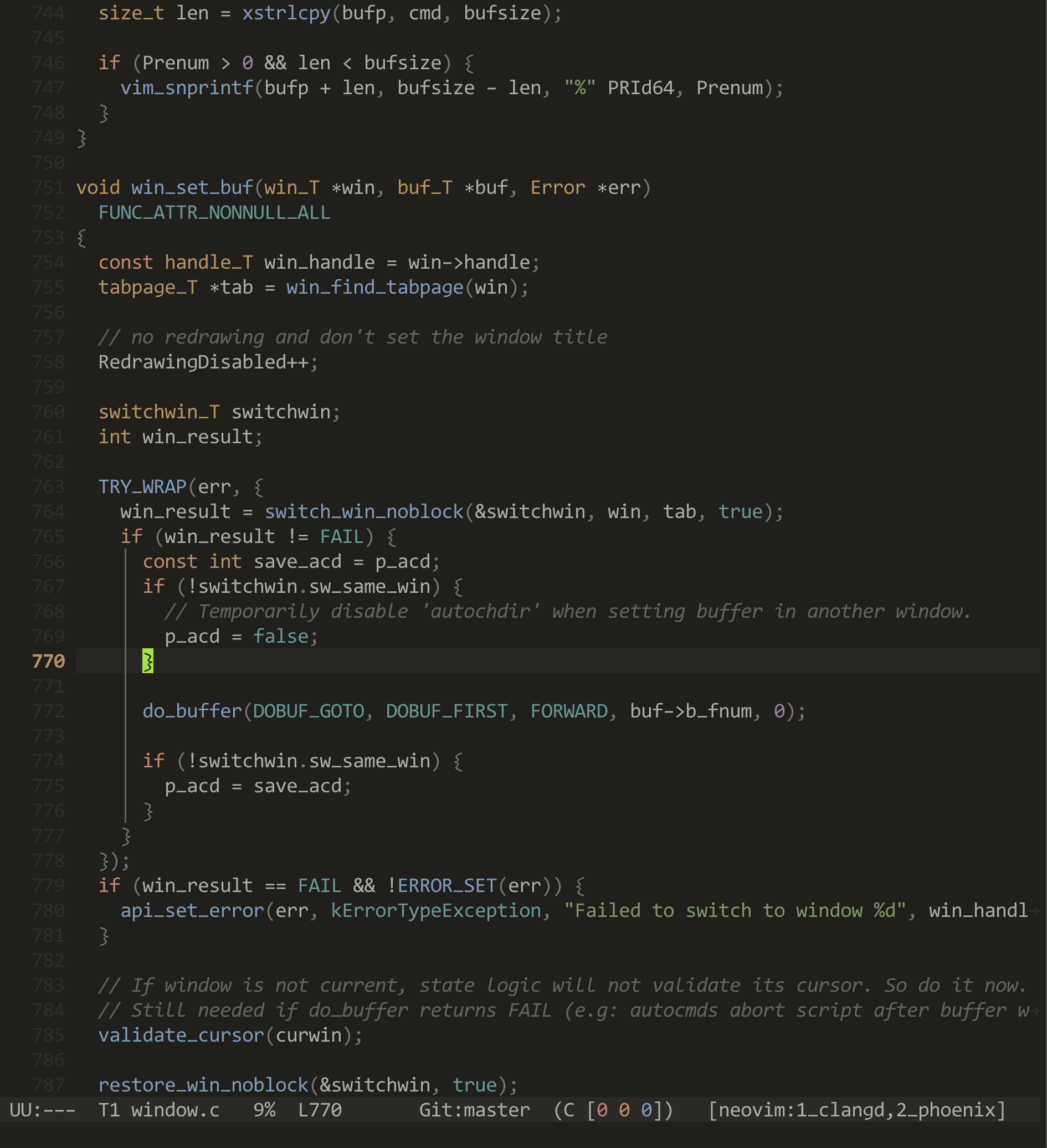
After using this theme for 2 months, the difference is remarkable:
- No more fatigue cycles: I can code for 10+ hours without eye strain
- Errors are immediately obvious: The layer works perfectly
- Structure is clear: Keywords/functions/types at guide my eyes to the code’s skeleton
- Variables don’t distract: Neutral colors reduce visual noise by ~75%
Individual Differences: A Note of Caution
It’s crucial to understand that vision is deeply personal. This theme was optimized for:
- My personal contrast sensitivity
- My typical viewing distance (~60cm)
- My display (MacBook Pro, ~400 nits)
- My ambient lighting (soft overhead lighting, ~300 lux)
Your mileage may vary. Factors that affect color perception:
- Age: Older adults need higher contrast [6]
- Display technology: OLED vs LCD affects color appearance
- Ambient light: Outdoor vs indoor viewing
- Individual differences: Color deficiency affects ~8% of males
How to Adapt This for Yourself
The beauty of the formula-based approach is that you can adjust the parameters rather than tweaking hex codes:
-- Want more contrast? Increase background-structure ΔL:
colors.orange = oklab_to_srgb(0.70, 0.055, 0.065)  -- was 0.68

-- Want lower saturation? Scale the a,b values:
colors.orange = oklab_to_srgb(0.68, 0.044, 0.052)  -- was (0.055, 0.065)

-- Want warmer tones? Shift hue by adjusting a,b ratio:
colors.orange = oklab_to_srgb(0.68, 0.050, 0.070)  -- more yellow
The formulas remain the foundation; you adjust coefficients rather than guessing hex values.
Summary and Takeaways
What started as frustration with arbitrary theme tweaking led to a systematic, science-based approach:
- Use perceptually uniform color spaces (Oklab) for predictable color manipulation
- Prioritize luminance hierarchy (CSF Theory) over hue differences
- Control saturation carefully (Color Fatigue research) for long-term comfort
- Respect perceptual thresholds (CIECAM02) for hue discrimination
- Align with semantic expectations (Color Semantics) for intuitive understanding
- Highlight structure, not noise (Hannebauer, Tonsky) for clarity
I hope this approach helps others escape the arbitrary theme-tweaking trap. The science exists—we might as well use it.
References
[1] Ottosson, B. (2020). A perceptual color space for image processing. https://bottosson.github.io/posts/oklab/
[2] Barten, P. G. J. (1999). Contrast sensitivity of the human eye and its effects on image quality. SPIE Press.
[3] Fairchild, M. D. (2013). Color appearance models (3rd ed.). John Wiley & Sons.
[4] Cao, T., Zhang, M., Jiang, Y., Lu, C., & Xu, Y. (2024). Effects of exposure to different light wavelengths on human eye fatigue. PMC, 11175232. https://www.ncbi.nlm.nih.gov/pmc/articles/PMC11175232/
[5] Schloss, K. B., & Palmer, S. E. (2024). Color semantics for visual communication. Annual Review of Vision Science, 10, 1-25.
[6] Owsley, C. (2016). Vision and aging. Annual Review of Vision Science, 2, 255-271.
[7] Hannebauer, C., Hesenius, M., & Gruhn, V. (2018). Does syntax highlighting help programming novices? Empirical Software Engineering, 23(5), 2795-2828.
Additional references:
IEC 61966-2-1:1999. Multimedia systems and equipment - Colour measurement and management - Part 2-1: Default RGB colour space - sRGB.
Tonsky, I. (2025). Syntax highlighting is a waste of time. https://tonsky.me/blog/syntax-highlighting/
The complete theme is available at here. Contributions and adaptations welcome.